Written
on
Windows Architecture
Simplified (I think) + forensic stuff
Do you really need to know this thing? Absolutely not. But I guess it helps to know more about how this thing works!
Boot Process
- Startup
- BIOS — Power On Self Test (POST)
- Operating System
- System Configuration
- System Utilities
- User Authentication
Whats under the trunk?
In a Windows environment, here’s the normal sequence:
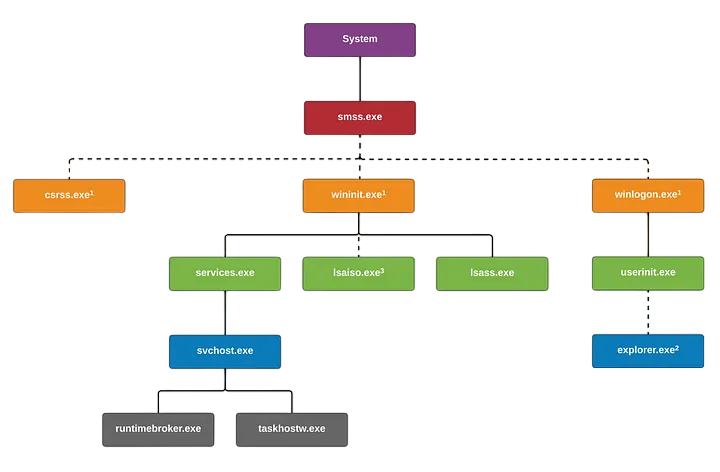
- System - one who wakes up smss.exe.
- smss.exe (Session Manager Subsystem or Windows Session Manager) - %SystemRoot%\System32\smss.exe - Responsible for creating and managing sessions.
- csrss.exe (Client/Server Run-Time Subsystem) - %SystemRoot%\System32\csrss.exe - Responsible for creating and deleting processes and threads, temp files, etc.
- wininit.exe (Windows Initialization Process) - %SystemRoot%\System32\wininit.exe - Responsible initializing program tasks in user-mode.
- winlogon.exe (Windows Logon Process) - %SystemRoot%\System32\winlogon.exe - Responsible for user logon/logoffs on windows.
- lsass.exe (Local Security Authority SubSystem) - %SystemRoot%\System32\lsass.exe - Responsible for enforcing local security policy on a windows system.
- services.exe (Service Control Manager) - %SystemRoot%\System32\services.exe - Responsible for starting and stopping services.
- userinit.exe (User Initilization process) - %SystemRoot%\System32\userinit.exe - Responsible for user environment initialization including execution of GPOs (Group Policy Objects) and logon scripts that may be set in an organization setting.
- svchost.exe (Service Host Process) - %SystemRoot%\System32\svchost.exe - Responsible for launching and hosting multiple DLL services i.e. it allows windows to group similar services together.
- taskhostw.exe (Host Process for Windows Tasks) - %SystemRoot%\System32\taskhostw.exe - Responsible for hosting processes that run DLLs.
- explorer.exe (Windows Explorer) - %SystemRoot%\Explorer.exe - Responsible for launching and managing windows Graphical User Interface (GUI) from the start menu to the taskbar to the file explorer and the files stored, and other stuff.
Note: Everything above is being created by NT Authority or a “higher being” in Windows OS. If you see that some other process were being created aside from the listed above. Something’s going on.
Common artifacts in Windows environment
-
NTFS (New Technology File System)
- (C:\$MFT) - Master File Table - Stores records of every file and directory.
- (C:\$LogFile) - Tracks MFT metadata changes
- (C:\$Extend$UsnJrnl:$J) (Alternate Data Stream) - Tracks file changes
-
Windows Registry
- System-specific Hives
- HKLM\SAM (%SystemRoot%\System32\config\SAM)
- HKLM\SECURITY (%SystemRoot%\System32\config\SECURITY)
- HKLM\SOFTWARE (%SystemRoot%\System32\config\SOFTWARE)
- HKLM\SYSTEM (%SystemRoot%\System32\config\SYSTEM)
- User-specific Hives
- HKEY_USERS<SID>\NTUSER.DAT (%UserProfile%\NTUSER.DAT)
- USERCLASS.DAT (%UserProfile%\AppData\Local\Microsoft\Windows\UsrClass.dat)
- System-specific Hives
-
Windows Event logs
- System (%SystemRoot%\System32\winevt\Logs\System.evtx)
- Security (%SystemRoot%\System32\winevt\Logs\Security.evtx)
- Application (%SystemRoot%\System32\winevt\Logs\Application.evtx)
- Terminal Services Logs for RDP (%SystemRoot%\System32\winevt\Logs\TerminalServices-LocalSessionManager%4Operational.evtx)
-
Other artifacts
- Executions
- Background Activity Moderator (BAM)
- %SystemRoot%\CurrentControlSet\Services\bam\UserSettings{SID}
- AmCache
- %SystemRoot%\AppCompat\Programs\Amcache.hve
- Windows Prefetch
- %SystemRoot%\Prefetch
- Shortcut (LNK) Files
- %USERPROFILE%\AppData\Roaming\Microsoft\Windows\Office\Recent\
- Background Activity Moderator (BAM)
- Persistence
- Auto-Run key
- HKLM\SOFTWARE\Microsoft\Windows\CurrentVersion\Run
- HKLM\SOFTWARE\Microsoft\Windows\CurrentVersion\RunOnce
- Startup Folders
- %AppData%\Microsoft\Windows\Start Menu\Programs\Startup (User-specific)
- %ProgramData%\Microsoft\Windows\Start Menu\Programs\Startup (System-wide)
- Windows Services -%SystemRoot%\ControlSet00#\Service
- Tasks
- %SystemRoot%\System32\Tasks
- SOFTWARE\Microsoft\Windows NT\CurrentVersion\Schedule\TaskCache\Tasks
- Auto-Run key
- Browser History
- Internet Explorer (%UserProfile%\AppData\Local\Microsoft\Windows\History)
- Google Chrome (%UserProfile%\AppData\Local\Google\Chrome\User Data\Default\History)
- Mozilla Firefox (%AppData%\Mozilla\Firefox\Profiles<ProfileName>\places.sqlite)
- RecycleBin (%UserProfile%\Recycle Bin)
- Executions
This post is more like a cheat sheet. Will flesh it out in the upcoming posts!